Sabtu, 17 Maret 2012

How To Level Fishing Blog With Unique Picture

Characteristics  features pictures angler visits to the blog :

1. Unique image,
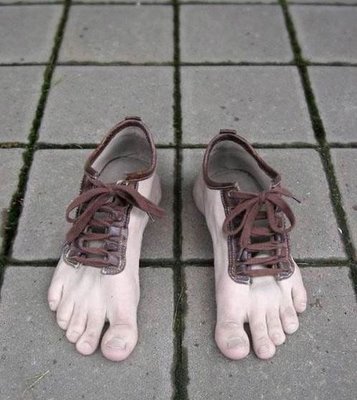
     As my friend look at my post, above there is a unique picture of a cat-headed chicken jago.Sungguh bizarre is not it? if it proved true picture there is actually an animal or not, I do not tahu.Saya only give suggestions to the curious and interested visitors to view the contents of this article.

2. Picture Hot / Sexy
     It is common knowledge, that if there are pictures on the internet pornography I'm sure many of my friend who would like to see more detail what is in telling the blog / site tersebut.Tetapi I do not recommend this way to my friend, because it can violate the Law on Pornography.

3. Picture of the political
     Again, politics, news koruptor.Nah again, my friend could take advantage of the current situation, for example by putting the pictures of the criminals from year to year, or put a picture of the flag of the party - the party in indonesia.Dengan so my friend could bring visitors to the Blog who are seeking information about politics.

4. image Technology
     In development at this time, have a lot of technology - technology that humans already in use in everyday life - a small hari.Contoh, in 2005 when I was in high school are still very few people who wear Funny or HP, while the current year 2011 each person already has HP each - each, even elementary school children had already had HP sendiri.Nah, by displaying the latest BlackBerry HP Image in posting buddy, I'm sure a lot of interested visitors to see the buddy information provided.

   Maybe it was just a few examples of the criteria for posting images . . .

Tips and tricks that many visitors your blog

Here I will give tips and tricks that many visitors your blog:

     Post something that is much sought after, needed, and useful for people banyak.Dan always update the post or article that we have.
     Utilizing Web directory (a service that groups the website or blog to a directory or a special category in accordance with the content (content) of the website / blog are) both locally and internationally. As http://technorati.com, www.topseratus.com, http://directory.resep.web.id, www.blog-indonesia.com and others.
     Utilizing Social Bookmarking (a method used by Internet users to share, organize, search, and manage resources web bookmarks. Sources bookmarked become a reference. Example we use the service in www.addthis.com, http://digg.com , http://delicious.com and others.
     Publish our blog via Social Network (friendship site) and NetworkBlog like facebook, twitter, somerset, foursquare, and others. Blog so that we are seen by our friends or others.
     Blogwalking or a trip to the blogs of others while leaving a trail through a comment or chat or chat facility.
     Installing widgets useful to improve the visitor as www.cbox.com, www.hitstats.com, www.prchecker.info, www.alexa.com.
     Take advantage of free advertising services / line and offline media such as the manufacture of pins, stickers, shirts and others. Then disseminated to our closest friends and family.

Similarly tutorial how to attract visitors to our blog in a natural way instead of the software or the things that fool the visitors. Hopefully benefit us all.  ^_^

Tips for your blog appear in Google Search engine

Here are the tips (for Google):
A. Try typing the URL address of your blog on google search and then press Enter. If your blog has come to mean Indes in google but it may still be unable to compete with others. And if your blog does not mean yet keindex appear in google. Try to register your blog in http://google.com/addurl km. The results are not directly so you know, so we need time to blog indexed by google.

2. "Blog Title", if you create a blog of course, we were told to make the blog title. This blog title is very important and very influential on the search results on search engines, so smart to choose a blog title km. Make a blog title that describes the content of blogs km. Do not be too long and not too short.

3. "Post Title". This post title is almost as important as the blog title. In making the post title or post title should be thought out very well, imagine kira2 titles are most suitable for postinganmu. Also imagine kira2 if km looking for articles about your post is, what keywords would km type in the search engines. Imagine that.

4. "Update Blog", frequently updated blog miles at least once a week were twice ato. It was once I feel the effects in one of my blog. My blog who initially had visitors from around 30-40% of search engine suddenly dropped to only about 3%. That happens because the blog had not I update, and when I update again, then my blog could go back into the ranks of top rank in search engine result.

5. "Promote your blog", promote your blog to many web / blog, forum, situs2 free promotions, etc.. As more and more spread out then it will link your blog more often searh engine spiders to visit your blog.

Steps to create a blog

Step by step how to make the blog below it ...A. All you have to prepare and required to make and make a blog on blogspot (blogger) is to have the first email. This email will be used to register the first time. if you can not or do not make email read here (click here), there was presented earlier about the steps to make the email. Take it easy do not rush. Read this guide first to run out, and then practiced. oke2. If you are creating an email, go to www.blogger.com address, and make sure that the website appears as belowthen click on the orange arrow that says Create YOUR BLOG3. After that make sure the page appears as shown belowthe email address field: enter your email retype email address: enter the same email again as aboveinput a paswod: lock lenses isiakan (at least 8 characters, letters can be numbers) typing reset your password: Enter again paswod have you input the same as aboveDisplay name: fill in your name or your alias name (it will appear bersamaa by posting, the article that you created)Verification: Please enter the word image is contained in the column.so for example like thisif it is filled with all the pictures click on the orange arrow (continue)4. It would then appear as ininamablog.JPGFill in the blog title, in accordance with the blog address keinginannmuisi also in accordance with your wishes, if your address using two words or more. pisahlah with a dot (.) or a dash (-). because they can not use spaces.is filled with examples like this picturesometimes we write the blog address has been used by someone else, if you have used another person means can not be used. To find others already in use or not Click on the link "check availability" if not used another person, then underneath it will appear in green text that reads this blog address is availableproceed if it is click on the menu5. Once you click continue the menu .. sure that appears like thisit is a template design window. to choose just click one. menu and then click continue, then that emerges is a picture like thisso you've finished creating a blog .... menngisi now living with the article you have ..6. Okay we just learn to fill in the article ... Click the Start menu Bloggingmaka will appear like the picture belowColumn headings for the title of the column width artikeldalam underneath it to write articles kamudan label to fill the type kategory articleI demonstrated thispress menu then publish the post, if it appears like thisthen you have successfully created an article, click the View menu to view BLogthen the show will like thisif it appears like it .. means you have completed and successfully create a post7. One time if you want to post a new article again, you do not need to register again ... just open https://www.blogger.com/start, kemudianmasukkan email you, and you just paswod, then click the "enter" and you will be taken to dashboard menu, the menu to set up your website ..thenif there is the literature of the above "you have not verified your email address", you immediately open the email you wrote that you entered earlier, certainly later in the inbox contained an email from google, about aktifikasi your account. Alama and then you click on the url contained in your inbox. like the picture belowafter you click ... it will pop up a window like thisindicate your accout is active .. and can be freely used8. Oh yes if you already have an email in Gmail. TIDA you need to register at the beginning ... but just enter your gmail email address and paswod you, then click the menu entry.examplethenif using email from Gmail, you do not need to enter a different email paswod and capta or just enter the code again ... just a display namefollow the same steps as above ....got here first post about the steps to create a blog on blogspot, hopefully pretty easy to understand, if you do not understand sorry, and can write any comments below if you have any questions and suggestions. Thank you. and good luck